Understand the question.
Start with the visitor’s message, page and conversation context.

The Corthex platform
Your knowledge, conversations and team. One connected workspace for helpful AI assistants.
Three connected parts of a more helpful customer experience.
Start with the visitor’s message, page and conversation context.
Look for relevant documents, product information and approved sources.
Answer with evidence, collect details or bring a teammate into the conversation.
FROM REAL CONVERSATIONS
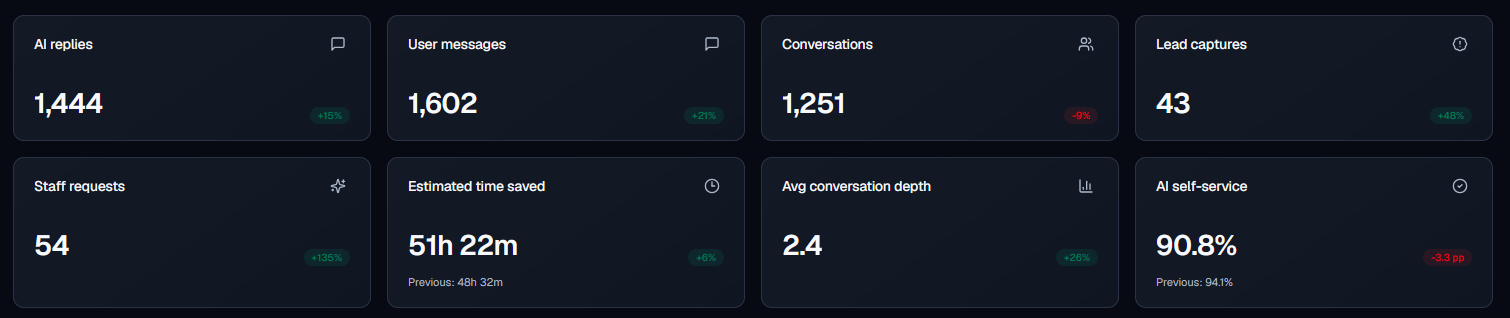
A recorded 30-day example from martijnkozijn.nl. Website and webshop conversations, with dashboard tests excluded.
Time estimate: 2.5 minutes of manual handling per verified exchange.
1,227 × 2.5 min ≈ 51 h 7 min. Verified exchanges × assumed minutes per exchange = estimated handling time avoided.
482 / 531 ≈ 90.8%. 49 conversations with a recorded staff request or contact handoff were excluded from the time estimate.
531 conversations with at least one verified customer–AI exchange form the denominator for this percentage.
A snapshot of one assistant, not a platform average or guarantee. No recorded handoff does not establish resolution or satisfaction. Results depend on knowledge, traffic and configuration.
CORTHEX ANALYTICS
Real dashboard screenshots from martijnkozijn.nl, shared with permission. Values reflect the period and filters at capture time and differ from the reviewed reference snapshot. Time saved is estimated; self-service does not establish resolution or satisfaction.
A closer look
Grounded answers
From a policy document to a product table. Connect the information your business relies on and show where an answer came from.

Human handoff
When a conversation needs your team, the history and context come along. Keep assignments, priorities and follow-ups together in the Inbox.

Developer tools
Start with the widget or build your own experience. Use the same knowledge, streaming answers and conversation controls through the API.

Made to work together
Bring documents, tables, product content and URLs together. Keep answers grounded in the sources you approve.
ExploreYour name, colors and welcome message. A helpful assistant that feels at home on your website. Visitors can follow live source and tool activity, then expand the summary to review timings and available sources. Enable optional voice input per assistant. The spoken language is detected automatically, independently of the interface language. Click the microphone to dictate up to 60 seconds; Stop replaces Send during recording. Stop, review or edit the draft, then press Send. Requires HTTPS, microphone permission and a compatible browser.
ExploreTake over with the conversation and context already there. Use team presence, assignment and AI-assisted replies to keep work moving.
ExploreConnect PrestaShop or WooCommerce. Help shoppers with products, orders and policies using the context of your store. For custom storefronts, a developer can connect the catalog, configurator and visitor-confirmed cart through the SDK; native integration and testing are required.
ExploreUse the current page and connected knowledge. Look up changing public information when a conversation needs it.
ExploreSee what customers ask, where answers need better sources and when your team steps in.
ExploreSet the appearance, tone and rules for each assistant. Manage visitor texts and visible workflow messages in one place, starting with seven prefilled languages. Add your own translations or review AI drafts that use credits, then choose automatic selection or a fixed default language.
ExploreUse streaming chat, scoped API keys and webhooks to bring Corthex into your own product and workflows.
ExploreFor a new assistant, choose which of three editable starter workflows to enable for visitor welcomes, first replies and product guidance. Six read-only baseline policies guide replies without granting access to private or connected data.
ExploreExplore supported setup paths, from your website and store to Slack, Instagram Direct and WhatsApp Business.
ExploreDraft, review and improve documents with your team. Keep useful content close to the assistants that need it.
ExploreSet up each new assistant in six steps: an optional scan of a public page, role, appearance preview, approved knowledge, tools and starters, then review with optional testing. Review suggested facts and sources before import; test questions use AI credits and integrations require separate setup.
ExploreMAKE IT YOURS
Shape more than the chat bubble. Decide how the assistant looks, answers and works with your team.
Available tools, handoff and capacity depend on your plan. Compare the included features
Connect your knowledge, try a conversation and make it your own.