Begrijp de vraag.
Begin bij het bericht, de pagina en de gesprekscontext van de bezoeker.

Het Corthex-platform
Je kennis, gesprekken en team. Eén verbonden werkplek voor behulpzame AI-assistenten.
Drie verbonden onderdelen van een betere klantervaring.
Begin bij het bericht, de pagina en de gesprekscontext van de bezoeker.
Zoek relevante documenten, productinformatie en goedgekeurde bronnen.
Antwoord met onderbouwing, verzamel gegevens of laat een collega aansluiten.
UIT ECHTE GESPREKKEN
Een vastgelegd praktijkvoorbeeld van 30 dagen bij martijnkozijn.nl. Website- en webshopgesprekken, zonder dashboardtests.
Tijdsraming: 2,5 minuten handmatig werk per geverifieerde uitwisseling.
1.227 × 2,5 min ≈ 51 u 7 min. Geverifieerde uitwisselingen × aangenomen minuten per uitwisseling = geschatte vermeden behandeltijd.
482 / 531 ≈ 90,8%. 49 gesprekken met een geregistreerd verzoek om een medewerker of contactoverdracht zijn uitgesloten van de tijdsraming.
531 gesprekken met minstens één geverifieerde klant-AI-uitwisseling vormen de basis van dit percentage.
Een momentopname van één assistent, geen platformgemiddelde of garantie. Zonder geregistreerde overdracht betekent niet automatisch opgelost of tevreden. Resultaten hangen af van kennis, verkeer en inrichting.
CORTHEX ANALYTICS
Echte dashboardscreenshots van martijnkozijn.nl, gedeeld met toestemming. De waarden horen bij de periode en filters op het moment van vastleggen en verschillen van het gecontroleerde praktijkvoorbeeld. Tijdsbesparing is geschat; zelfservice bewijst geen oplossing of tevredenheid.
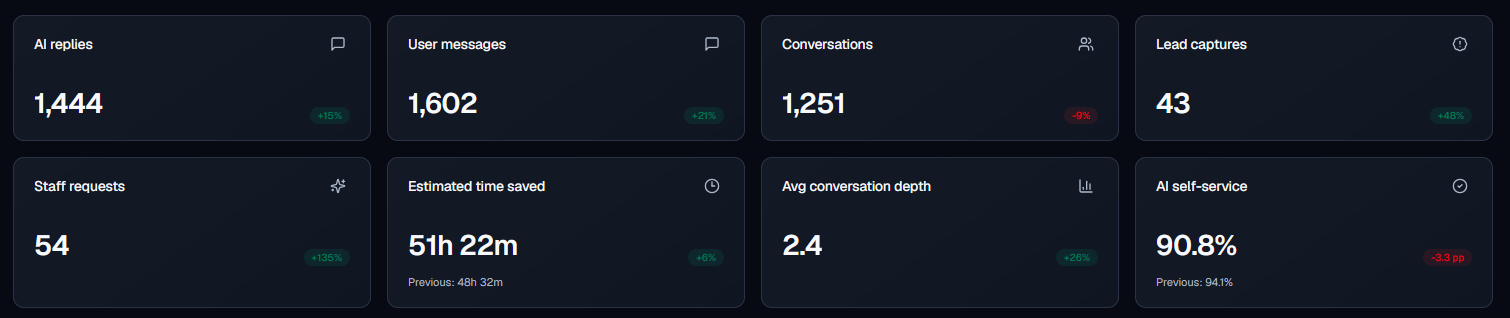
Van dichtbij
Onderbouwde antwoorden
Van een beleidsdocument tot een producttabel. Verbind de informatie waar je bedrijf op draait en laat zien waar een antwoord vandaan kwam.

Menselijke overdracht
Heeft een gesprek je team nodig? De geschiedenis en context gaan mee. Houd toewijzingen, prioriteiten en opvolging samen in de Inbox.

Developer-tools
Begin met de widget of bouw een eigen ervaring. Gebruik dezelfde kennis, streaming antwoorden en gesprekscontrole via de API.

Gemaakt om samen te werken
Breng documenten, tabellen, productinformatie en URL’s samen. Houd antwoorden verbonden met de bronnen die jij goedkeurt.
Ontdek meerJouw naam, kleuren en welkomstbericht. Een behulpzame assistent die thuishoort op jouw website. Bezoekers volgen bronzoekacties en toolgebruik live en kunnen daarna de tijdsduur en beschikbare bronnen bekijken. Schakel optionele spraakinvoer per assistent in. De gesproken taal wordt automatisch herkend, onafhankelijk van de interfacetaal. Klik op de microfoon om maximaal 60 seconden te dicteren; Stop vervangt Verzenden tijdens de opname. Stop, controleer of bewerk het concept en klik daarna op Verzenden. HTTPS, microfoontoestemming en een geschikte browser zijn vereist.
Ontdek meerNeem over met het gesprek en de context bij de hand. Werk samen met teamstatus, toewijzing en AI-hulp bij antwoorden.
Ontdek meerKoppel PrestaShop of WooCommerce. Help bezoekers met producten, bestellingen en beleid vanuit de context van je winkel. Voor eigen webshops kan een ontwikkelaar de catalogus, configurator en door bezoekers bevestigde winkelwagenacties via de SDK aansluiten; integratie met je eigen systeem en testen zijn vereist.
Ontdek meerGebruik de huidige pagina en verbonden kennis. Zoek actuele openbare informatie op als een gesprek daarom vraagt.
Ontdek meerZie wat klanten vragen, waar betere bronnen nodig zijn en wanneer je team inspringt.
Ontdek meerBepaal uiterlijk, toon en regels per assistent. Beheer bezoekersteksten en zichtbare workflowberichten op één plek, met zeven vooraf ingevulde talen. Voeg eigen vertalingen toe of beoordeel AI-concepten die credits gebruiken en kies automatische taalkeuze of een vaste standaardtaal.
Ontdek meerGebruik streaming chat, afgebakende API-sleutels en webhooks voor jouw product en werkprocessen.
Ontdek meerKies bij een nieuwe assistent welke van drie bewerkbare startworkflows je inschakelt voor welkom, eerste antwoorden en productadvies. Zes vaste basisregels geven richting aan antwoorden en verlenen geen toegang tot privégegevens of gekoppelde data.
Ontdek meerOntdek ondersteunde installatieroutes: van website en webshop tot Slack, Instagram Direct en WhatsApp Business.
Ontdek meerSchrijf, beoordeel en verbeter documenten met je team. Houd nuttige content dichtbij de assistenten die het nodig hebben.
Ontdek meerStel elke nieuwe assistent in via zes stappen: een optionele scan van een openbare pagina, rol, uiterlijk met live voorbeeld, goedgekeurde kennis, tools en startworkflows, en tot slot controle en optioneel testen. Beoordeel voorgestelde feiten en bronnen vóór import; testvragen gebruiken AI-credits en integraties stel je apart in.
Ontdek meerHELEMAAL JOUW ASSISTENT
Bepaal meer dan de kleur van de chat. Kies hoe je assistent eruitziet, antwoordt en samenwerkt met je team.
Beschikbare tools, overdracht en capaciteit hangen af van je plan. Vergelijk de inbegrepen functies
Verbind je kennis, probeer een gesprek en maak het van jou.